
Cybersecurity career advice
How Recruiters Actually Skim a Cybersecurity Resume
A practical guide for career changers: make your target role, relevant experience and proof easier to see.
By Luke Gough · Recruiter and career coach · 9 minute read
You finished the cert. You built a lab. You updated your CV. Then silence.
One problem worth checking before you send another application: can someone quickly see how your existing experience fits the role you want?
When I first open a cybersecurity resume, I look for the target role, relevant experience and evidence worth reading more closely. If those are buried, a capable career changer can be easy to overlook.
Make three things obvious near the top of your CV: the role you are targeting, the relevant work you have actually done, and one clear example of what you can do. Keep your real job titles and label personal projects honestly.
This guide shows you how to do that, with example summaries, before-and-after experience bullets and a quick checklist.
What I look for in the first skim
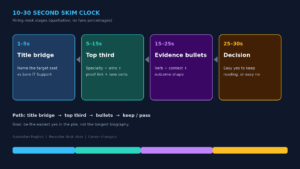 Think of this as a 30-second clarity test, not a measured rule about how every recruiter works. The time spent on an application varies with the role, employer and stage of the hiring process.
1. A clear target role
A headline that only says “IT Support” tells me where you are now. A short line underneath can explain where you want to go.
For example:
- IT support professional targeting junior identity and access management roles
- Service desk analyst with access administration experience, targeting IAM analyst roles
- MSP technician targeting entry-level security operations roles
These are example headlines, not job titles to add to your employment history. Keep the title your employer gave you. Use the summary to explain the transition.
Choose the target that fits the vacancy. “SOC, GRC, pentesting, cloud and security architecture” gives the reader too many different stories to untangle.
2. Relevant evidence near the top
The first part of your resume should make the connection between your background and the vacancy easy to see. Depending on your experience, that could be:
- Access requests, identity checks and approval records for an IAM role.
- Control documentation, risk records and audit evidence for a GRC role.
- Phishing ticket triage, escalation and a clearly labelled investigation lab for a junior SOC role.
Include only work you have done. Completing a lab can demonstrate learning, but it is not the same as handling incidents in a production environment.
3. Specific experience bullets
“Responsible for IT support” gives me very little to assess. A useful bullet explains your action, the context and the result or purpose.
Use actual tools, responsibilities and outcomes. Add numbers when you can support them, but do not invent a percentage improvement just to make the bullet sound impressive.
4. A reason to read further
A relevant project, a clear example of adjacent work or a well-explained achievement can create that reason. Your CV should still make sense without a recruiter opening any external link.
Try the practical test: give someone 30 seconds with the first page. Can they identify your target role and one relevant capability? If not, revise the first section before adding more detail.
How to structure a cybersecurity resume when changing careers
Start with your strongest relevant evidence. Someone with substantial governance work may lead with employment. Someone whose strongest security evidence is a personal project may put that project before less relevant experience.
A useful starting structure is:
- Name, contact details and relevant professional links.
- A short professional summary naming the target role.
- Relevant skills, supported by examples elsewhere in the CV.
- Experience and selected projects, ordered by relevance.
- Certifications and education.
Keep employment history in reverse chronological order. Use familiar section headings and readable spacing. Do not force years of useful experience onto one page by shrinking the text. Follow any length or format instructions in the application.
A summary that explains the transition
Fictional example, adapt only where accurate:
IT support professional targeting junior IAM analyst roles. Experience processing access requests, documenting approvals and supporting joiner-mover-leaver tickets. Completed a personal conditional access review lab covering policy intent, exclusions and test results. CompTIA Security+ certified.
This tells the reader the target, the relevant employment background and the separate learning evidence. It is more useful than “passionate professional seeking an exciting opportunity in cybersecurity”.
If you come from insurance, operations, finance or another field, apply the same approach. Explain the actual risk, controls, investigation or governance work you performed. Do not rename ordinary administrative work as cybersecurity experience.
Rewrite IT support bullets without inventing experience
The following examples show how to make real responsibilities clearer. They are fictional samples. Keep only the actions, tools and authority that match your own work.
Account access and password resets
Before: Responsible for password resets and unlocking accounts.
After: Verified users through the approved identity-check process before resetting credentials and unlocking accounts in Active Directory; recorded actions and escalated exceptions.
Why it helps: It shows the control you followed, the tool and the record you kept.
Phishing reports
Before: Helped users with phishing emails and spam.
After: Triaged user-reported suspicious emails, captured message details and escalated cases to the security team in line with the support runbook.
Why it helps: It explains your part in the process without claiming you led an incident investigation.
Endpoint maintenance
Before: Installed updates and antivirus on laptops.
After: Deployed approved endpoint updates, checked installation status and followed up failed deployments through support tickets.
Why it helps: It describes the follow-through. Add your actual management tool and device scope if relevant and verifiable.
New starter access
Before: Processed access requests for new starters.
After: Fulfilled approved application and group access requests for new starters, checked requests against recorded approvals and documented completion.
Why it helps: It makes the approval trail visible without implying you designed the organisation’s access policy.
Documentation and escalation
Before: Updated knowledge base articles and escalated issues.
After: Updated support instructions for identity and endpoint procedures; escalated security-related tickets with timelines, user impact and supporting evidence.
Why it helps: It gives the reader something concrete to ask about in an interview.
Do not replace your real title with “SOC Analyst” or “Security Engineer” because some tasks were security-related. Better wording should make the work clearer, not make the role bigger.
Where certifications and project links belong
Make relevant credentials easy to find. A certification specifically requested in the vacancy deserves visibility. Less relevant training should not crowd out stronger evidence.
Keep completed certifications separate from study in progress. List the exact credential you hold, and do not imply that completing a course means you passed the certification exam.
For projects, put a short description on the CV and a descriptive link beside it. “GitHub available on request” adds another step for the reader.
Fictional project example:
Conditional access review, personal lab. Documented policy intent, test accounts, exclusions and test results in a simulated tenant. Practised explaining access decisions and limitations. Link the project title to your own write-up.
Explain what you built, what you tested and what you learned. Avoid saying one lab “proves job readiness”. It is one piece of evidence, alongside your other skills and experience.
Test the link in a signed-out browser. Remove confidential employer information, customer details and credentials before sharing any work sample.
Keep the formatting easy to read and submit
An applicant tracking system, or ATS, may extract information from your file. Employer systems and workflows differ, so there is no universal formatting trick that guarantees an interview.
- Follow the employer’s requested file type.
- Use standard headings and a simple layout.
- Keep important information in selectable text, not an image.
- Use relevant language from the job description only when it accurately describes your experience.
- Check any fields the application form fills from your CV and correct errors before submitting.
- Use a clear filename, such as Firstname-Lastname-IAM-CV.pdf.
- Check your contact details and links.
Good formatting makes your evidence easier to assess. It does not replace meeting the requirements of the role.
Your quick resume skim checklist
- The summary names one clear target role.
- Your real employment titles remain intact.
- Relevant work or project evidence appears early.
- Experience bullets describe specific actions and context.
- Personal labs are clearly distinguished from paid employment.
- Certifications are accurate and relevant.
- Project links work, and the CV explains the evidence without requiring a click.
- The document is readable and follows the application instructions.
- You can explain and defend every claim in an interview.
Start with the first page. Make the target role clearer, improve two relevant bullets and bring your strongest evidence forward. Those are manageable changes you can make before your next application.
Keep building your cybersecurity career
For more practical advice from the recruitment side, watch Luke Gough on YouTube.
If you want a structured resource to help plan your search and present your experience, the Cybersecurity Job-Ready Blueprint is US$14.99.
Frequently asked questions
Should I hide my IT support job title?
No. Keep your actual title and use a short summary to explain the role you are targeting. Describe relevant responsibilities accurately within your employment history.
Do I need a one-page cybersecurity CV?
There is no single length that suits every career changer. Prioritise relevant information, readable formatting and the employer’s instructions. Do not remove useful experience solely to meet an arbitrary page count.
Where should my portfolio link go?
Place it beside a relevant project description, high enough to be noticed. Say what the project demonstrates on the CV itself, because the reader may not open the link during the initial review.
Can a certification make up for no cybersecurity employment?
It can support your application, but it does not establish production experience. Combine relevant learning with honest examples from your previous work and clearly labelled projects.